Cursor review: the Plus, Premium, Super and Ultra plans on paper
Cursor suits developers happy with Grok models and a low entry price, but no tier publishes usage counts, so real limits are unclear.
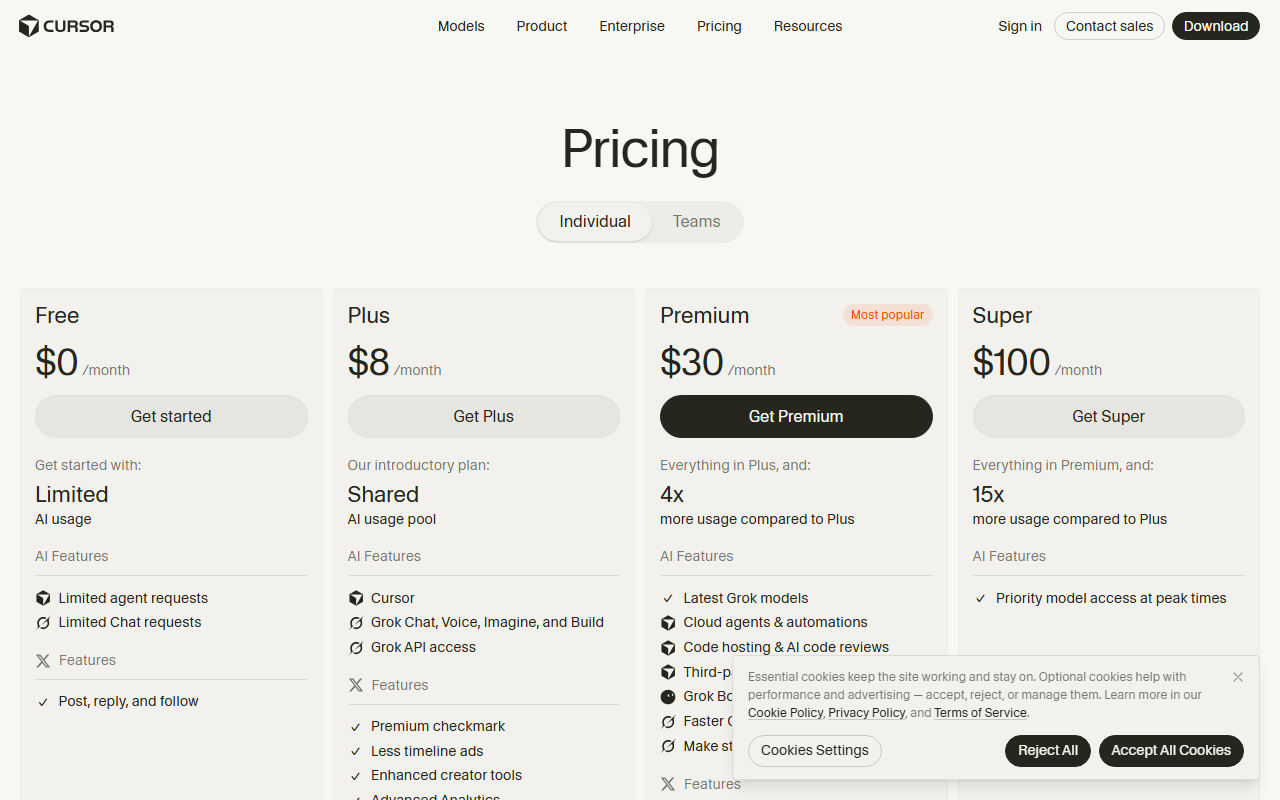
Cursor is an AI code editor and coding agent. It is now sold as part of The X Subscription (Grok, Cursor and X). The lineup has a Free tier, four paid individual plans called Plus, Premium, Super and Ultra, per-seat Teams pricing and custom Enterprise pricing. This review looks at what those plans promise on paper.
It is based on public pricing and documentation, not hands-on testing. Pricing facts come from Cursor’s pricing page, models-and-pricing docs and help pages, checked on 2026-10-30. The pricing page and the models-and-pricing page were re-read on 2026-11-02 and show the same prices and multiples. Product facts come from Cursor’s changelog. Anything Cursor has not published should be confirmed on its site before buying.
The short version: the price ladder is clear, but the usage behind it is not. Cursor publishes no request or credit counts for any tier. Every tier above Plus is described as a multiple of an amount that nobody outside Cursor can count.
Pricing
The tiers
| Plan | Monthly | Annual | Annual, per month | Usage as stated by Cursor |
|---|---|---|---|---|
| Free | $0 | n/a | n/a | “Limited” agent and chat usage |
| Plus | $8 | $80 | $6.67 | “Basic”, “Shared AI usage pool” |
| Premium | $30 | $300 | $25 | “4x more usage compared to Plus” |
| Super | $100 | $1,000 | $83.33 | “15x more usage compared to Plus” |
| Ultra | $200 | $2,000 | $166.67 | “50x more usage compared to Plus” |
The per-month annual figures are the annual price divided by 12. On every tier, annual billing saves two months compared with paying monthly. Free has no third-party models.
How the usage pool works
Every paid plan includes one weekly pool of usage for Cursor models: Grok 4.7, Grok 4.6, Grok 4.5 and Composer 2.5. The pool is shared across Agent in the editor, the CLI, Cloud Agents, Grok Bot and the Grok apps. Different models draw from the pool at different rates, so the same pool lasts longer on some models than on others. The current per-model rates are in the models-and-pricing docs.
Cursor says the pool “refreshes weekly, so one heavy day doesn’t use up your month.” Unused usage does not roll over.
What Plus includes and leaves out
Plus is the entry point at $8 a month, or $80 a year on annual billing. Only Grok models are available. Cursor models run at fixed settings: Fast is off, effort is medium, and Grok 4.7 uses the 256k context window.
Plus has no Auto, Cloud Agents, Automations, Bugbot, Origin, third-party models or own API keys. The pricing page also lists Grok Bot, video generation, priority model access at peak times and team management features (centralized billing, SSO) as not included.
Premium, Super and Ultra
Premium costs $30 a month or $300 a year. Super costs $100 a month or $1,000 a year. Ultra costs $200 a month or $2,000 a year. Each is stated as a multiple of Plus usage: 4x, 15x and 50x. Cursor does not say what Plus usage amounts to in requests, tokens or credits, so the multiples cannot be turned into a concrete number. The pricing page should be checked for which features each higher tier unlocks.
Third-party models and prepaid credit
The pricing page says “Premium and above include generous usage of Grok models but do not include an allowance for third-party models.” Claude, GPT and Gemini models remain available on Premium and above. They are billed at the model’s API list price from the first request, paid from prepaid credit, and that usage is not included in the monthly prices shown.
Prepaid credit can be added through manual top-ups or Auto Top-up. It also pays for Cursor-model usage beyond the weekly pool at the same per-model rates. Cursor’s help pages say credit expires 365 days after purchase. A monthly additional usage limit caps how much paid additional usage can be consumed each month, regardless of how much credit is held.
Teams and Enterprise
Teams costs $30, $100 or $200 per seat per month, depending on whether the seat is at the Premium, Super or Ultra tier. The pricing page shows “$30+/user/month” and usage of “4-50x Plus”. Teams and Enterprise pay an extra Cursor Token Rate of $0.25 per million tokens on eligible third-party model requests, including bring-your-own-key requests. It does not apply to individual plans. Enterprise pricing is custom, and its usage is described as “Pooled”.
What the multiples are worth
StackVersus arithmetic on the published figures shows the ladder is not linear:
- Premium costs 3.75 times the Plus price for 4 times the pool.
- Super costs 12.5 times the Plus price for 15 times the pool.
- Ultra costs 25 times the Plus price for 50 times the pool.
On paper, each step up buys more pool per dollar than the one before, and Ultra has the strongest ratio. The caveat is the baseline. Fifty times an unpublished amount is still an unpublished amount, so the ratio shows relative value inside Cursor and says little about absolute capacity.
Comparable plans elsewhere
Vendor pages were checked between 2026-10-30 and 2026-11-01. The following plans sit near Cursor’s upper tiers:
- Claude Max costs $100 a month for 5x the Pro plan’s usage per five hours and per week.
- Claude Ultra costs $200 for 10x Pro weekly, with no five-hour limit on verified accounts.
- GitHub Copilot Max costs $100 with 20,000 AI credits. One credit equals $0.01, and 10,000 of them are flex credits that GitHub says may change.
- OpenAI ChatGPT Pro costs $100 or $200 with no five-hour Codex limit.
- Kiro Pro Max costs $100 for 5,000 credits.
These cannot be lined up directly. Each vendor measures usage against a different baseline, and Cursor’s multiples are measured against Plus. One difference does matter: Copilot and Kiro publish a countable monthly allowance, and Cursor does not.
Strengths
A low entry price with a clear ladder. Plus at $8 a month, or $80 a year, is a small commitment. The four paid tiers are easy to read, and the jump from one to the next is stated as a multiple instead of buried in fine print.
A weekly refresh. Cursor’s own wording is that the pool “refreshes weekly, so one heavy day doesn’t use up your month.” For people whose work comes in bursts, a weekly reset is gentler than a single monthly bucket. A bad Tuesday does not leave the rest of the month empty.
One pool across surfaces. The same pool covers Agent in the editor, the CLI, Cloud Agents, Grok Bot and the Grok apps. A developer does not need to track separate allowances for each way of reaching the models. This is a simpler model than per-surface limits.
Better ratios at the top. Super at 12.5 times the Plus price for 15 times the pool, and Ultra at 25 times the price for 50 times the pool, reward heavy users on paper. Anyone who would otherwise stack several lower-tier subscriptions has a reason to move up.
Third-party models without a markup on individual plans. Premium and above can reach Claude, GPT and Gemini at the model’s API list price from the first request. The extra Cursor Token Rate of $0.25 per million tokens applies only to Teams and Enterprise, not to individual plans. Developers who want to mix models are not locked to Grok.
A fast-moving product. The changelog shows steady output across recent weeks:
- 2026-10-20: An Agent SDK became generally available. An agent is defined as a folder of code. The file instructions.md is the prompt, each file in tools/ is a typed action, skills/ holds procedures, mcp-connections/ adds MCP tools, and channels/ defines where the bot answers. Agents can wake on pull request, comment and CI events from GitHub, GitLab and Bitbucket, on Slack mentions and DMs, and on webhooks and cron schedules. They can be tested with evals, then deployed to Cursor with agent-sdk deploy or run on the user’s own infrastructure.
- 2026-10-16: Cloud agents gained interactive canvases that can be shared by link. An Environments API entered beta. Cloud agent environments support up to 300 repositories, and Cursor says large environments load 5x faster.
- 2026-10-13: The Origin App Marketplace integrates with over 20 apps for deployments, CI, code review, security, monitoring and project management. Partners include Cloudflare, Linear, Sentry and Socket Security, and the marketplace is open to public submissions.
- 2026-10-06: Remote Control lets users see and reply to local agents running on their computer from the Cursor iOS app.
Earlier entries include Rollouts and Security Review (2026-09-23), Cursor Projects (2026-09-10), Self-hosted machines (2026-09-02) and Origin Code Hosting (2026-08-17). Whether any of these features suit a given workflow needs checking against real use, but the pace suggests active development.
Weaknesses
No countable usage. This is the central problem. Cursor publishes no request or credit counts for any tier. Plus is described only as “Basic” with a “Shared AI usage pool”, and every higher tier is a multiple of that. A buyer cannot estimate in advance how many agent runs a week a plan will cover, or whether $30 or $100 is the right spend. Copilot and Kiro publish a countable monthly allowance, which makes planning easier.
Plus is heavily restricted. Plus allows only Grok models at fixed settings, with Fast off and effort at medium. It has no Auto, Cloud Agents, Automations, Bugbot, Origin, third-party models or own API keys. The pricing page also lists Grok Bot, video generation, priority access at peak times and team management features as not included. Several features in the changelog, including cloud agent canvases and anything involving Origin, appear to sit outside what Plus offers.
Third-party models cost extra. Premium and above include no allowance for Claude, GPT or Gemini. Those models are billed at API list price from the first request, from prepaid credit, on top of the monthly price. A developer who mainly wants those models gets nothing toward them from a $200 Ultra plan. The total bill is the plan price plus whatever the credit balance covers, and the monthly additional usage limit is the only brake.
Credit expires and does not stretch the pool. Prepaid credit expires 365 days after purchase. Credit used for Cursor models beyond the weekly pool is billed at the same per-model rates, so overflow is a paid cost and not a softer limit. Unused weekly usage does not roll over, so a light week is simply lost.
Different models drain the pool at different rates. Without published counts, how fast a given model uses the pool is hard to translate into everyday work. The models-and-pricing docs are the place to check, and the rates could change.
Remote Control has conditions. It is on by default except for Enterprise organizations, and the computer must stay on and online. Administrators may want to review that default.
New packaging. Cursor is now sold as part of The X Subscription (Grok, Cursor and X). Buyers should confirm on Cursor’s site how the plans are presented and what is bundled before paying.
Who should use it
Developers who are comfortable with Grok models and want a low-cost start. Plus at $8 a month fits someone who wants to try the editor and agent with Grok and Cursor models. It suits a person who accepts fixed settings and no Cloud Agents.
Individuals who want more headroom with monthly billing. Premium at $30 a month is the natural step up from Plus. It offers 4x the pool for 3.75 times the price and keeps third-party models available on a pay-as-used basis.
Heavy agent users who can live with unpublished limits. Super and Ultra have the best pool-per-dollar ratios in the lineup. They suit people who run agents across the editor, the CLI and Cloud Agents and expect to use much of a large pool. These buyers should keep a budget for third-party credit.
Builders of custom agents. The Agent SDK is generally available. It offers triggers from GitHub, GitLab, Bitbucket, Slack, webhooks and cron, plus evals and a choice of Cursor-hosted or self-hosted deployment. Teams that want that structure may find the platform worth the price.
Teams that want seat-based pricing. Teams at $30, $100 or $200 per seat per month maps cleanly to the individual tiers. Buyers should account for the extra $0.25 per million tokens on eligible third-party requests.
Who should skip it
Anyone who needs a countable allowance. If the budget depends on knowing the number of requests or credits per month, Copilot Max and Kiro Pro Max publish them and Cursor does not.
Buyers who want third-party models bundled in a flat fee. Cursor’s paid tiers include Grok models, not Claude, GPT or Gemini. Developers who mainly want those models may prefer a plan where they are included.
Developers who need Cloud Agents or Bugbot on the cheapest plan. Plus excludes them. Anyone who needs those features should plan for a higher tier and confirm the details on the pricing page.
People who want bring-your-own-key on a budget plan. Plus does not allow own API keys, and Teams and Enterprise add a per-token rate to bring-your-own-key requests.
Those who need predictable monthly spend. Credit top-ups, Auto Top-up and a monthly additional usage limit give some control. Even so, spend on third-party models and overflow can vary from month to month.
Verdict
On paper, Cursor offers a clear price ladder and a sensible weekly refresh, but it hides the one number buyers most want, which is how much usage each tier actually contains. Plus at $8 a month is a low-risk way to try Grok-only agents, as long as the missing features are acceptable. Premium at $30 is the most sensible next step for individuals. Super and Ultra have better ratios on paper, but they are worth buying only after real usage shows that the lower tiers run out. Developers who need third-party models should budget for prepaid credit on top of the plan price, and anyone who requires countable allowances should look at Copilot or Kiro first. The practical advice is to start on monthly billing, watch how fast the weekly pool drains, and move to annual billing, which saves two months, only once the fit is proven. Current prices, rates and feature lists should be confirmed on Cursor’s site before purchase.
The Stack Brief
Get the weekly brief
One email a week: SaaS pricing changes, launches worth knowing about, and one comparison you can act on.
Sources
Related stories
Which AI coding plans let buyers count what they get
Most AI coding plans meter usage in units buyers cannot count. Only Copilot, Kiro, Bolt, Lovable and Augment publish a monthly unit that can be priced.
Pham Cong10 min
Grok Bot meters jumped: why the X Subscription's weekly pool can't be audited
One weekly pool now spans Cursor, Grok Bot and the Grok apps, but with no per-model rates published, users cannot verify a sudden meter jump.
Pham Cong8 min

ChatGPT and Codex will share one usage allowance from December
OpenAI says Plus, Pro and Business plans will pool ChatGPT and Codex usage from December, so heavy users should check how their limits will change.
Pham Cong2 min
Comments
Join the discussion with your GitHub account. Be civil, stay on topic.